Getting Started
This guide introduces AC-Hunter and how it works with Zeek to detect and investigate network threats.
What Is AC-Hunter?
AC-Hunter is a threat-hunting platform that helps security teams quickly identify command-and-control (C2) and other suspicious network behavior. It provides:
- Dashboards and analytics: Intuitive views of beacons, strobes, long connections, C2-over-DNS, and threat-intelligence hits, and more.
- Threat scoring: Connections are scored so you can prioritize what to investigate first
AC-Hunter requires Zeek logs to operate. It does not capture traffic itself. In the default setup, those logs are imported from a Zeek sensor: the sensor observes a copy of your network traffic, produces Zeek-format logs (connections, DNS, HTTP, SSL/TLS, etc.), and ships them to the AC-Hunter server. AC-Hunter imports the logs, runs behavioral analysis, and surfaces results in the web interface.
Logs can also come from other sources that produce Zeek-format output. For example, the Espy project, which collects traffic from Windows hosts (e.g. remote workers) and writes Zeek-style logs. For this documentation we focus on the standard deployment: AC-Hunter with logs from a Zeek sensor.
AC-Hunter and Zeek: How They Work Together
AC-Hunter (server and UI)
The AC-Hunter server is the core of the deployment. It:
- Accepts Zeek logs from local and remote sensors (see Zeek Configuration)
- Imports and processes logs in time-based chunks (e.g. hourly, daily)
- Runs detection logic for beacons, strobes, long connections, C2 over DNS, and threat intelligence
- Stores data and serves a web interface for hunting and investigation
- Can send alerts (e.g. to syslog)
- Provides safelist management
The server components run in Docker (API, database, syslog, etc.). You access AC-Hunter through the web interface to run hunts, drill into scored connections, and document findings.
Zeek (network sensor)
Zeek (formerly Bro) is an open-source network analysis framework. In the default AC-Hunter setup it is the network sensor that supplies the logs AC-Hunter needs:
- Zeek sees a copy of traffic (via SPAN/mirror port or TAP)
- It produces structured logs: connections (
conn), DNS, HTTP, SSL/TLS, and optional open_* logs for connections still open at rotation - Logs are written in Zeek’s native TSV (or JSON) format and shipped to the AC-Hunter server (e.g. under
/opt/zeek/logsand/opt/zeek/remotelogs), where the importer picks them up
Active Countermeasures provides a Docker-based Zeek deployment (docker-zeek) that is included in the download bundle. You can also use an existing Zeek-compatible sensor (e.g. Corelight). Zeek sensors are placed in the network so they see both inbound and outbound Internet traffic.
In short: Zeek answers “what happened on the network.” AC-Hunter answers “which of that is suspicious and worth investigating.”
Default flow
- Network traffic is copied to the Zeek sensor (SPAN/mirror or TAP).
- Zeek produces Zeek logs (conn, dns, http, ssl, open_*, etc.) and they are delivered to the AC-Hunter server.
- AC-Hunter imports the logs, runs detection, and stores results.
- Analysts use the AC-Hunter UI to hunt, score, and investigate.
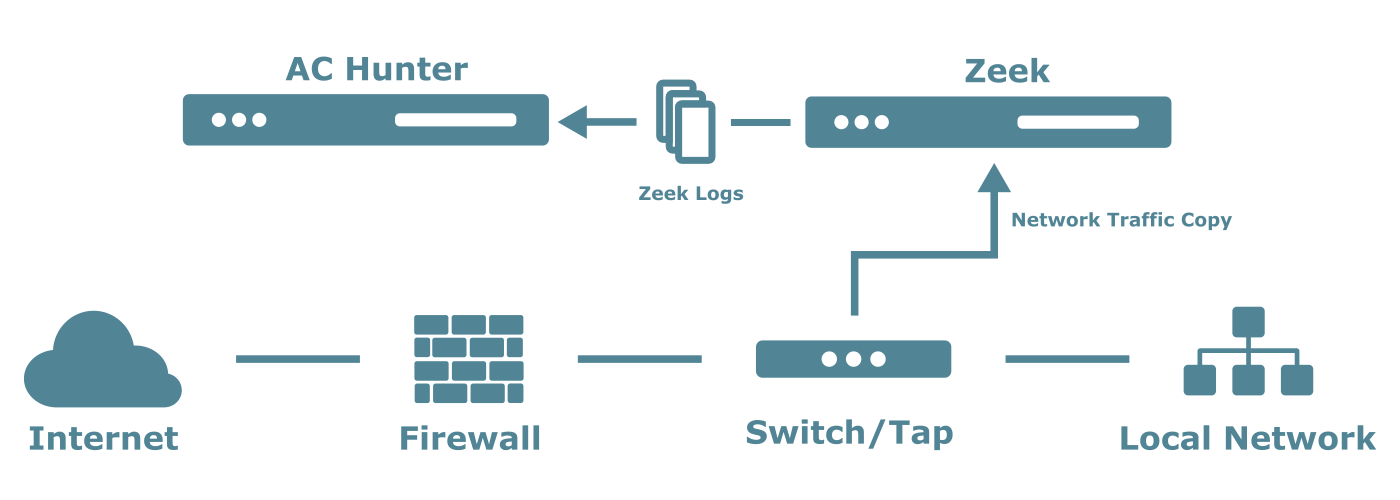
Deployment Setup Overview
Setting up AC-Hunter involves these steps, in order. Each section below covers what you need to have ready before reaching step 2.
| Step | What you do | Guide |
|---|---|---|
| 1 | Plan your deployment: Understand the components, choose hardware, plan sensor placement and monitoring scope | This page |
| 2 | Install AC-Hunter: Deploy Docker, run the installer, complete initial configuration on the AC-Hunter server | AC-Hunter Installation |
| 3 | Install and configure Zeek: Deploy the Zeek sensor, configure the capture interface, verify logs are being generated | Zeek Configuration |
| 4 | Set up log transport: Configure ZeekShip to deliver Zeek logs from the sensor to the AC-Hunter server | Zeek Log Transport |
| 5 | Start hunting: Once logs are flowing, use the AC-Hunter interface to run hunts and investigate detections | Analysis Overview |
Before You Install
This section covers what you need in place before running the installer: deployment components, how packet capture fits in, hardware, and supported platforms. More detail on Zeek sensor placement, log formats, and configuration is covered in the Zeek Configuration section.
Deployment components
An AC-Hunter deployment has two primary components:
- AC-Hunter server: Processes Zeek logs and provides the investigation interface (web UI, database, import pipeline).
- Zeek sensor(s): Observe network traffic and generate the Zeek logs that AC-Hunter imports. For reliable packet capture, the Zeek sensor should run on dedicated physical hardware rather than a virtual machine, since VM scheduling and resource contention can cause silent packet loss under load. See Virtualization for details.
Both can run on the same system, but for best performance and scalability we recommend AC-Hunter and Zeek on separate hosts. Multiple Zeek sensors can forward logs to a single AC-Hunter server. The Zeek package provided by Active Countermeasures (docker-zeek) is preconfigured for threat detection and includes additional log types (open_conn, open_http, open_ssl) that capture connections still open at log rotation. These improve AC-Hunter's ability to detect long-lived connections like persistent C2 channels. Existing Zeek-compatible sensors (e.g. Corelight) can also be used, but may not produce these open connection logs by default. AC-Hunter will work without them, but long connection detection coverage will be reduced. See Zeek Configuration for details. For shipping logs from a Corelight sensor, see Corelight SFTP Export.
Planning your monitoring scope
Before finalizing hardware and sensor placement, decide what traffic you want to monitor. This affects sensor count, hardware sizing, and how you configure your SPAN port.
Key questions to answer:
- Which links matter most? For most organizations the highest-value target is the perimeter Internet connection, since the path between your internal network and the Internet is where C2 traffic crosses. If you have multiple Internet uplinks or remote sites with their own connections, each may need its own sensor.
- Are there high-volume segments you want to exclude? Traffic like storage replication, backup jobs, or internal video conferencing can inflate throughput without adding meaningful threat-hunting value. These can be excluded via BPF filters on the Zeek sensor to reduce hardware requirements and noise in AC-Hunter results.
Your answers will directly inform the hardware sizing table below and the number of Zeek sensors you need to deploy.
How packet capture needs to work
Zeek does not sit in the path of your traffic. It analyzes a copy of the traffic that your network equipment sends to the sensor. That copy is what we mean by "packet capture" in this context.
- Traffic flows through your normal network path (e.g. through switches and routers to the Internet).
- Your network device (managed switch, router, or dedicated TAP) is configured to send a copy of that traffic to the interface where the Zeek sensor is connected. This is typically called a SPAN port, mirror port, or network TAP.
- Zeek receives the copied traffic on the sensor, analyzes it, and writes Zeek logs (conn, dns, http, ssl, etc.).
- Those logs are shipped to the AC-Hunter server, which imports them and runs detection.
Only managed switches, routers, or dedicated TAP devices can provide this copy. Unmanaged switches cannot. Before installing, confirm that your network team can configure a SPAN/mirror port or TAP so that the Zeek sensor sees both outbound and inbound Internet traffic you care about. Sensor placement and log configuration are discussed further in Zeek Configuration.
Place the sensor inside the firewall
Configure the SPAN/mirror port on the internal interface of your firewall or on the internal core switch, not outside the firewall. Most firewalls perform Network Address Translation (NAT), which replaces internal source IPs with a single public address. If Zeek captures traffic outside the firewall, AC-Hunter sees only the public IP and cannot identify which internal host is responsible for suspicious connections.
Two other environments require extra consideration before finalizing sensor placement:
- HTTP proxy: Place the sensor where it sees traffic from internal endpoints to the proxy, not just the proxy's outbound connection, so the real source IP is visible.
- Internal DNS forwarders: If clients send DNS queries to an internal forwarder rather than directly to external resolvers, a sensor at the perimeter only sees the forwarder's IP, not the individual endpoints, which breaks C2-over-DNS detection. A second internal sensor is needed.
See Sensor Placement for details on all of these scenarios.
Hardware requirements
| Role | Deployment size | CPU | Memory | Storage |
|---|---|---|---|---|
| AC-Hunter server | Minimum | 8 cores | 32 GB RAM | 1 TB SSD |
| AC-Hunter server | Recommended | 16+ cores | 64 GB+ RAM | 2+ TB SSD (fast storage recommended) |
| Zeek sensor | Up to 100 Mbps | 4–8 cores | 16 GB RAM | 500 GB+ |
| Zeek sensor | Up to 1 Gbps | 8–16 cores | 64 GB RAM | 1 TB+ |
| Zeek sensor | Up to 10 Gbps | 16–32+ cores | 128 GB+ RAM | 2 TB+ (depending on retention) |
- Multiple Zeek sensors can forward logs to one AC-Hunter server. Higher traffic volumes need more CPU, memory, and storage; storage depends on log retention. Large or high-throughput environments may need multiple distributed sensors.
- Zeek sensors need a dedicated capture NIC sized to handle the peak throughput of the mirrored traffic. See Sizing the capture NIC for guidance.
Storage configuration: Format the primary partition with XFS (ext4 also works, but XFS performs better for the write patterns produced by Zeek and AC-Hunter's database). Avoid RAID 5 or RAID 6 on both the Zeek sensor and AC-Hunter server, as the parity overhead significantly degrades write performance for log storage and database operations. RAID 1 (mirroring) or RAID 10 are acceptable if redundancy is needed.
Log retention: As a rough guide, a network carrying 200–500 Mbps of mixed traffic typically produces 25-100 GB of Zeek logs per day (depending on the characteristics of the network traffic). Decide your target retention period before provisioning storage and size accordingly. You can monitor actual daily log volume after deployment and adjust.
Supported operating systems
AC-Hunter 7 runs on supported 64-bit Linux systems. Use a freshly deployed, fully updated system for installation.
Supported platforms:
- Ubuntu 22.04 and 24.04
- CentOS Stream 9
- Rocky Linux 9
- Red Hat Enterprise Linux (RHEL) 9
Other distributions may work but are not officially supported unless documented by Active Countermeasures.
SELinux and AppArmor
AC-Hunter 7 is designed to work with default SELinux or AppArmor policies; disabling them is no longer generally required. If you hit installation or runtime issues related to SELinux or AppArmor, collect relevant logs and open a support request at portal.activecountermeasures.com/support/support-request/.
Internet access requirements
Both the AC-Hunter server and Zeek sensors need outbound internet access during installation and for ongoing operation. This includes access to Docker Hub for pulling container images, your distribution's package repositories for OS updates, threat intelligence feed URLs, and DNS resolution. Ensure outbound HTTPS (TCP 443) and DNS (UDP/TCP 53) are permitted from each system.
If outbound internet access is restricted or unavailable in your deployment environment (for example in an air-gapped or heavily filtered network), see Air-gapped setup in the installation guide before proceeding.
Pre-installation checklist
Before you run the installer, confirm:
- You have an active AC-Hunter license and a customer portal account to download the install bundle
- A supported 64-bit Linux system is deployed and fully updated
- Hardware meets the minimum recommended CPU, memory, and storage above
- Zeek sensor is running on dedicated physical hardware (not a VM); see Virtualization
- On the Zeek sensor host, the capture NIC has no IP address (not even via DHCP); only assign an address to the management NIC during OS installation
- Network team has configured a SPAN / mirror port or network TAP so the Zeek sensor can see traffic
- SPAN / mirror port is on the internal side of the firewall so internal host IPs are not obscured by NAT
- Zeek sensor placement allows visibility into both inbound and outbound Internet traffic you want to analyze
- If environment uses internal DNS forwarders or an HTTP proxy, sensor placement has been reviewed; see Sensor Placement
- Outbound internet access is available from all systems (Docker Hub, OS package repos, threat intel feeds, DNS); see Internet access requirements above
- Root or sudo access is available on all deployment systems
- Firewall rules allow Zeek sensors to send logs to the AC-Hunter server (see Zeek Log Transport for required ports)
- Hostnames, IPs, and routing are finalized; NTP is configured and synchronized on all systems, since clock skew between the Zeek sensor and AC-Hunter server will cause logs to be misfiled or missed
Download the Install Bundle
You will need an active AC-Hunter license and a customer portal account to access the installer. If you have not yet purchased a license or created your portal account, do that first at portal.activecountermeasures.com. Once logged in, download the latest AC-Hunter 7 install bundle.
The download is a single .tar.gz file (achunter-install-bundle-v7.0.4.tar.gz) that contains all of the installers for your deployment. We recommend downloading and extracting it on your workstation first:
Inside you will find the following installers:
- AC-Hunter installer (
AC-Hunter-v7.0.4.tar.gz): for the AC-Hunter server - Zeek installer (
zeek-linux-amd64.tar.gz): for each Zeek sensor - ZeekShip installer (
zeekship-v1.0.0.tar.gz): for each Zeek sensor running natively (log transport to AC-Hunter) - ZeekShip Docker installer (
zeekship-docker-v1.0.0.tar.gz): for each Zeek sensor running in Docker (log transport to AC-Hunter) - Tripwire installer (
Tripwire.msi): the deception agent for Windows hosts running deception tokens
Copy each installer to the system where it will be installed using a secure method (e.g. scp, sftp, or an approved file-transfer tool):
- Transfer the AC-Hunter installer to the AC-Hunter server, then follow the AC-Hunter Installation guide.
- Transfer the Zeek installer to each Zeek sensor, then follow the Zeek Configuration guide.
- Transfer the appropriate ZeekShip installer (Docker or native) to each Zeek sensor, then follow the Zeek Log Transport guide.
- Transfer the Tripwire installer to each Windows host where you want to deploy deception tokens, then follow the Cyber Deception guide.
Optional Integrations
AC-Hunter can be extended with optional tools. For details and setup, see their open-source repositories:
-
Espy: Collects network traffic from Windows hosts (e.g. remote or work-from-home) and produces Zeek-format logs on a central server. Those logs can be imported into AC-Hunter like any other Zeek sensor, with host identifiers (e.g. NetBIOS names) to distinguish remote hosts.
-
BeaKer: Host-based forensics using Sysmon, Winlogbeat, Elasticsearch, and Kibana. When investigating an internal IP in AC-Hunter, you can open BeaKer to see which Windows host, process, and user generated that traffic.
Next Steps
Follow the setup steps in order:
- AC-Hunter Installation: Install Docker, run the installer, and complete initial configuration.
- Zeek Configuration: Deploy the Zeek sensor and configure packet capture.
- Zeek Log Transport: Set up ZeekShip to deliver logs from the sensor to AC-Hunter.
- Analysis Overview: How AC-Hunter scores and classifies threats once data is flowing.